
CAGED System Explained on Guitar
The CAGED system is one of the most useful ways to understand the guitar neck, but it often gets explained in a way that makes it feel more confusing than helpful. The real value of CAGED is not memorizing five shape names. It is using those five repeating regions to connect chords, scales, and chord tones across the fretboard.
What the CAGED system actually is
The CAGED system is built from five open chord shapes: C, A, G, E, and D. When those shapes are moved up the neck, they create repeating forms for the same chord in different places. That repeating structure is what gives the neck a visual pattern.
Many players hear that definition and still feel stuck because it sounds abstract. A better way to think about it is this: CAGED divides the fretboard into five repeating chord regions. Each region gives you a place to find the chord, the nearby scale pattern, and the most important target notes around it.
CAGED is not just a chord system. It is a fretboard organization system. Once you understand that, it becomes much easier to use in both rhythm and lead guitar.
Why the CAGED system helps the neck make sense
One reason guitarists feel overwhelmed is that the neck looks the same in every direction. Without a map, it can feel like a grid of disconnected frets. CAGED helps because it gives you repeating landmarks.
Instead of asking, “Where are the notes for this key?” you start asking, “Which chord region am I in right now?” That question is much easier to answer in real time. Once you know the region, you can usually find the roots, the scale notes, and the chord tones much faster.
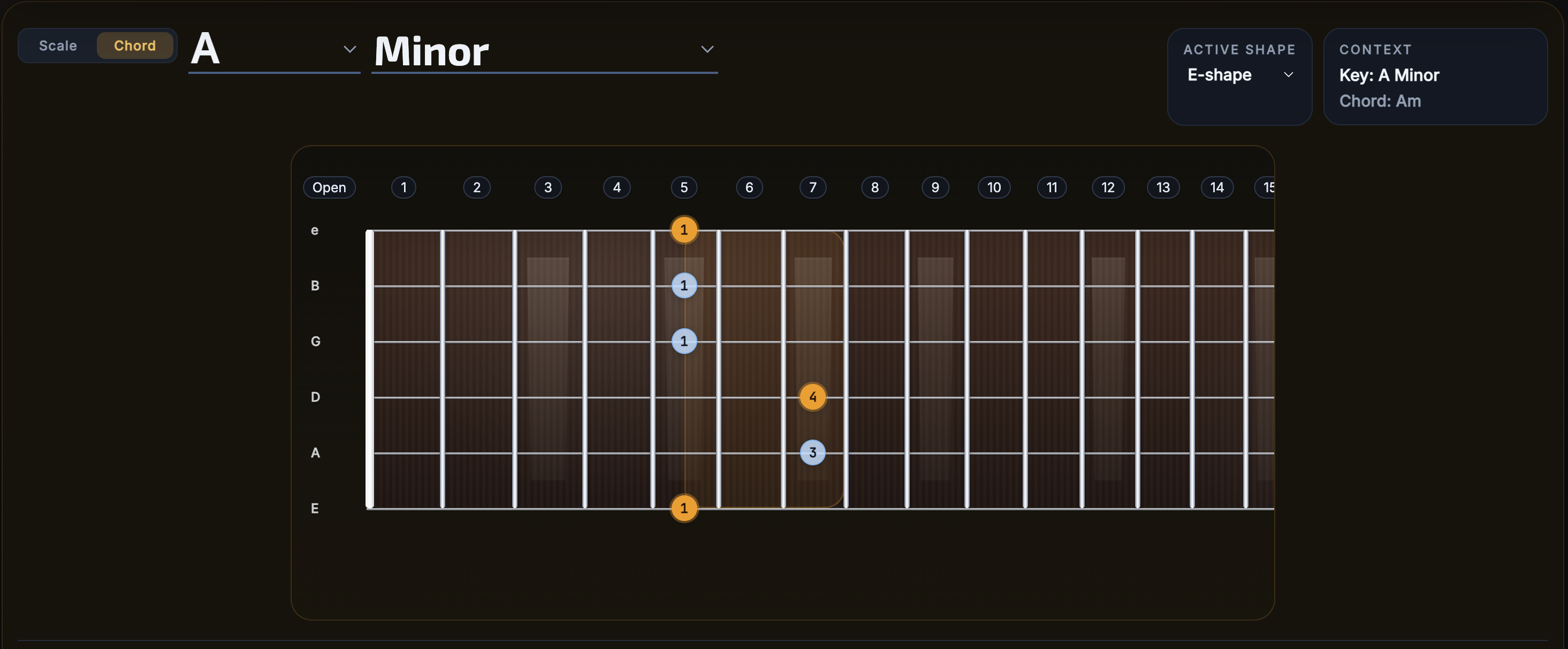
FretScope showing one chord shape region clearly labeled, with the active shape visible in the UI.
Why CAGED is useful for scales, not just chords
A common misunderstanding is that CAGED only matters if you want to play chord inversions or barre chords. In reality, it becomes even more useful when you start connecting it to scales.
Each CAGED shape creates a region where scales and chord tones live together. That means a scale pattern stops being a random box and starts becoming a musical area built around an actual chord shape. This is one of the biggest reasons intermediate players suddenly feel like the neck is more organized.
What that looks like in practice
If you know you are in an E shape region, you can begin to see not just the chord, but also where the root, third, and fifth sit nearby. From there, scales, pentatonic ideas, and melodic phrases become easier to target with intention.
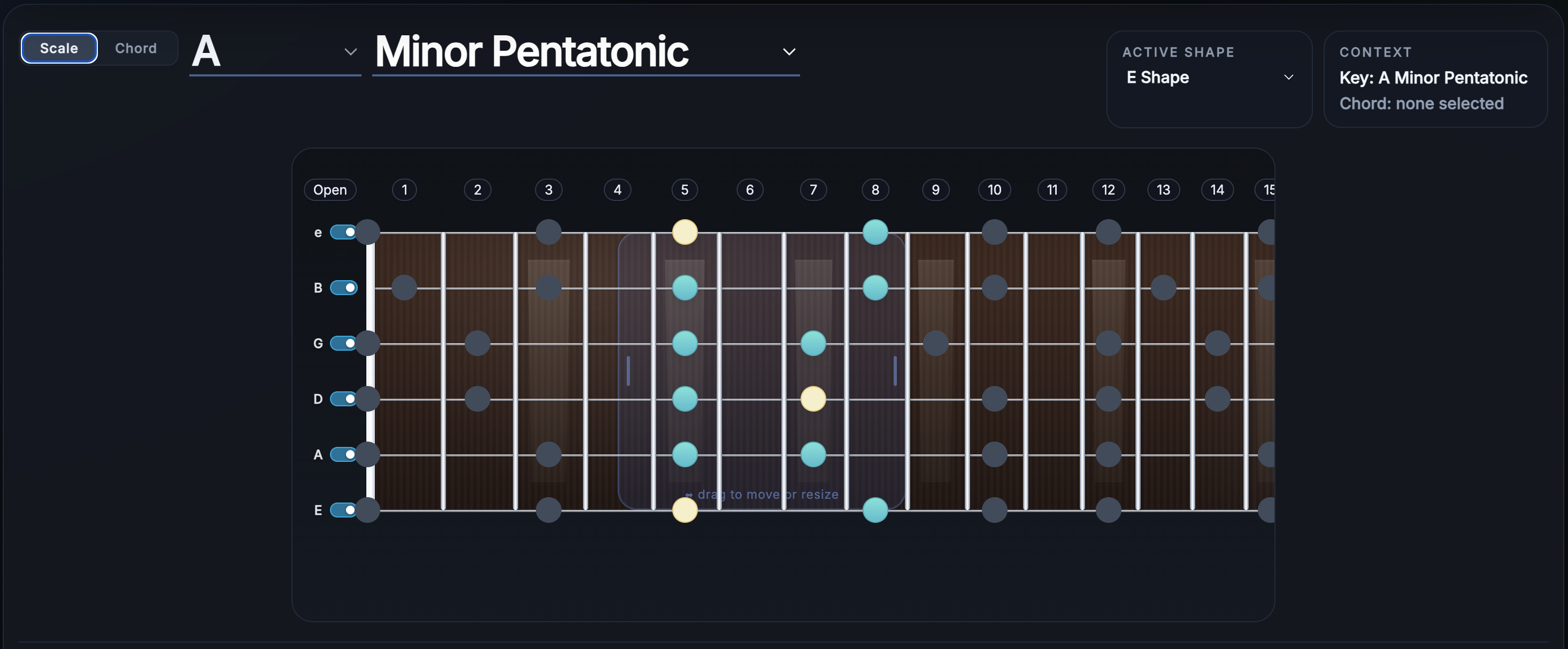
FretScope in scale mode showing a scale map inside one CAGED region or active shape window.
How to start learning CAGED without getting lost
You do not need to master every shape at once. A much better approach is to take one key and one shape at a time. Find the chord. Then find the root notes in that region. Then compare the nearby scale pattern.
- Pick one key.
- Select one CAGED shape region.
- Find the root notes first.
- Play the chord shape, then the surrounding scale.
- Move to the next neighboring shape and compare the overlap.
This gives you a sequence that feels practical instead of theoretical. It also teaches the neck in layers, which is much easier to retain.
How CAGED connects to pentatonic and full scale patterns
One of the best uses of CAGED is that it helps explain why pentatonic and diatonic patterns sit where they do. A shape region gives you the framework. The scale pattern fills in the notes around that framework.
This is especially useful for soloing. Instead of practicing scale runs with no harmonic context, you can practice inside a shape where the underlying chord is already visually obvious. That makes it easier to target stable notes and understand why some notes feel stronger than others.
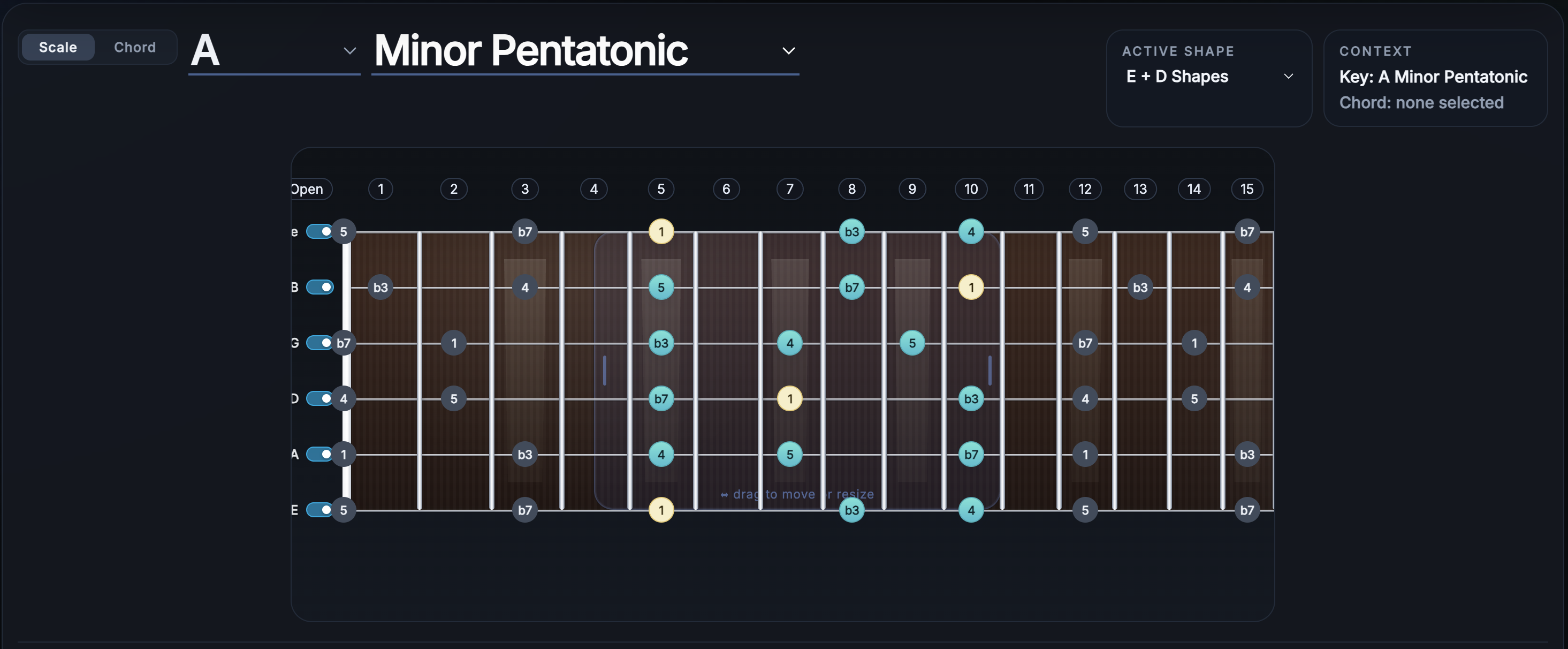
FretScope showing the same key in two neighboring CAGED regions so the handoff between shapes is easy to see.
How to use CAGED for chord-tone targeting
CAGED becomes much more musical when you connect it to chord tones. Instead of only thinking about shapes, start looking for the root, third, fifth, and seventh inside the active region. That changes your practice from “running notes” to actually following the harmony.
If you are working over a progression, this becomes even more helpful. You can stay in one area of the neck and watch how the important target notes change from chord to chord. That is where the system stops being a theory label and starts becoming a real playing tool.
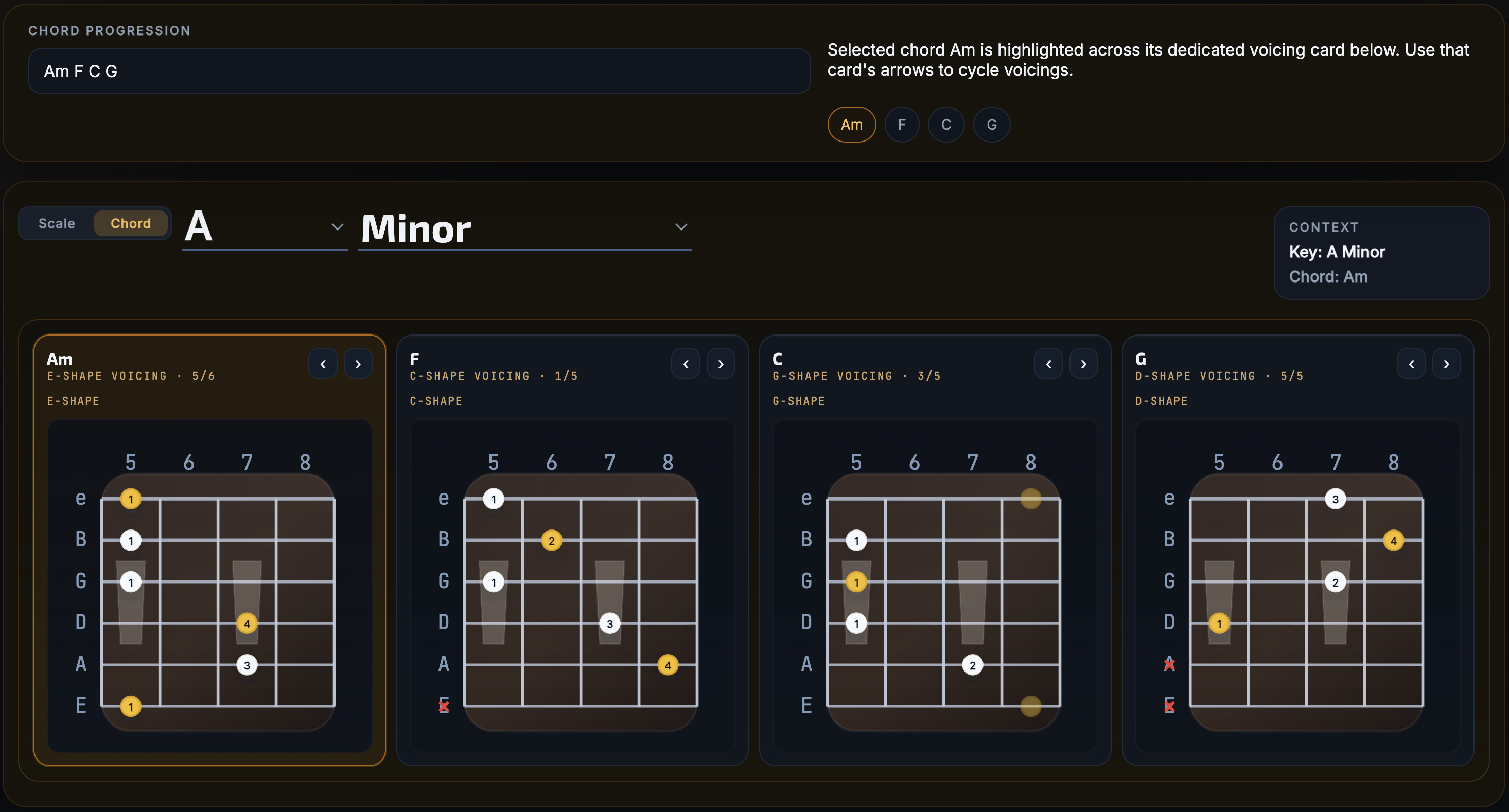
FretScope with a simple progression entered, showing how a selected chord highlights its tones inside one shape region.
The mistake that makes CAGED feel harder than it is
The biggest mistake is trying to memorize the whole system in the abstract. If you treat CAGED as five names and five diagrams, it can feel dry and confusing. If you treat it as a way to organize one key on the neck, it becomes much more intuitive.
The right question is not “Can I recite all the shapes?” The right question is “Can I find this chord region, locate the roots, and connect it to the nearby scale?” That is a much more useful standard because it leads directly into playing.
Use FretScope to make the CAGED system visual
FretScope is a good fit for learning CAGED because it lets you see shape regions, move between positions, compare scale and chord views, and keep the neck visible while you work through one key at a time. That makes it easier to build the kind of connected fretboard understanding that static charts usually do not provide.
Try this in FretScope
Choose one key, pick one shape region, find the roots, and then compare the chord and scale views in the same area of the neck. After that, move into the neighboring shape and look for the overlap.
Open FretScopeFrequently asked questions
Do I need to use all five CAGED shapes in every key?
No. The goal is to understand that all five exist and connect. In practice, you often focus on one or two nearby regions at a time.
Is CAGED only for chord playing?
No. It is useful for chords, scales, pentatonic patterns, arpeggios, and chord-tone targeting because it helps organize the neck visually.
What is the best way to practice the CAGED system?
Pick one key, learn one shape region, find the roots, then compare the surrounding scale pattern and move into the next connected shape.